A big week for channels. The preset generator got rebuilt into a staged, non-destructive flow, the built-in channels got a long-overdue quality pass, and the filter engine underneath all of it got a lot faster.
Weekly highlights
- The preset generator is now a staged Select, Preview, Build flow that reconciles instead of wiping and rebuilding, so it keeps the channels you already have.
- A big quality pass on the built-in channels: they pick a movie or TV lane, long series rotate instead of hogging airtime, and grown-up channels no longer fill up with kids' cartoons and anime.
- A new filter engine builds and previews channels much faster: about 4.6x faster overall, and up to around 78x on the heaviest filters.
- Some smaller polish, and you can now drive Airwave from an MCP client like Claude Desktop.
A new way to set up preset channels
The preset generator used to be one destructive button: every run deleted all of its channels and rebuilt them from scratch. It's a staged flow you drive now, and it reconciles instead.
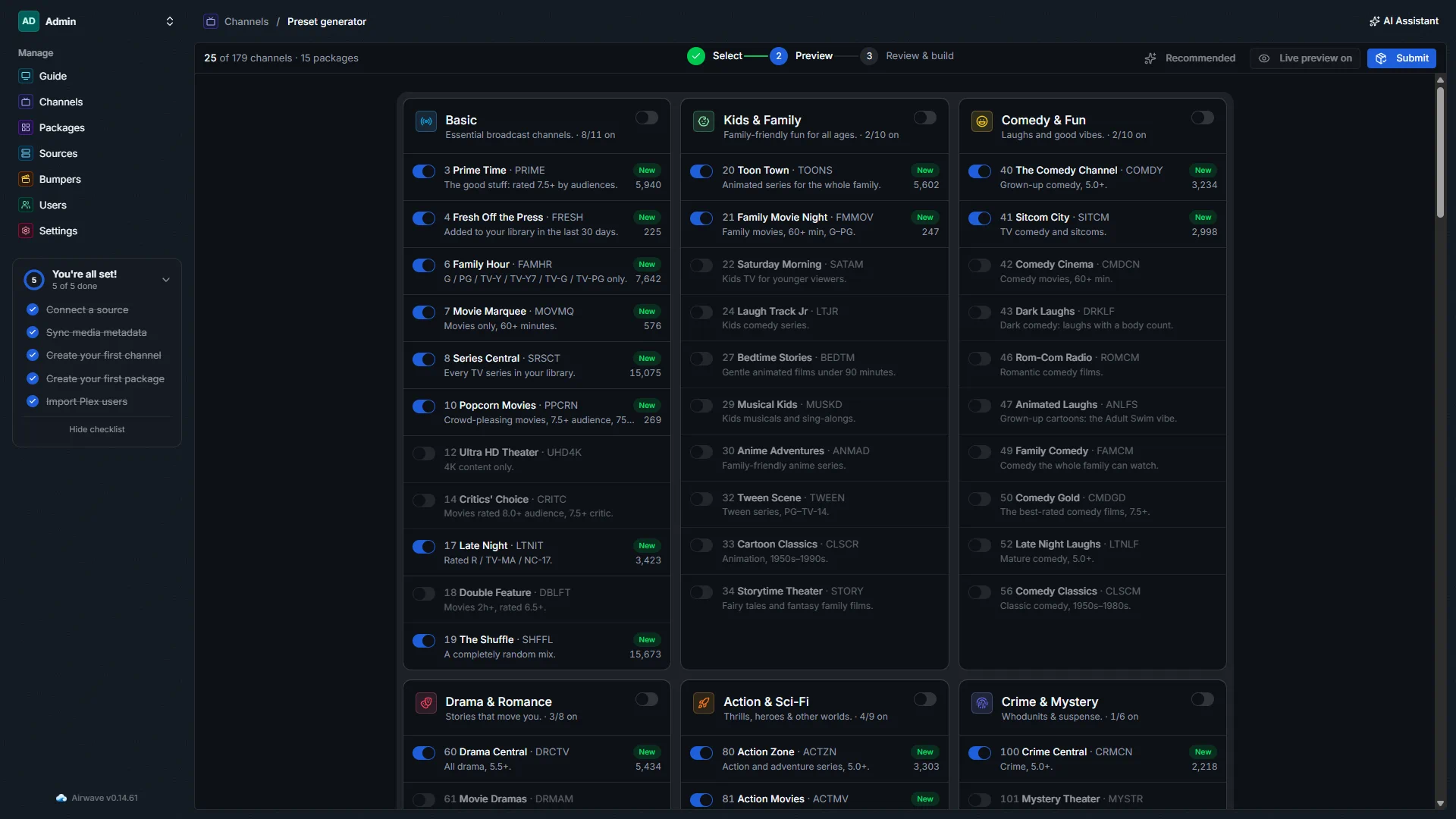
You start on a staging page (Channels, Auto-generate, Preset generator) with three steps: Select, Preview, Build. Pick the packages and channels you want, and each one is badged up front from a diff, New, Update, Unchanged, or Remove, before anything resolves. Hit Preview to see the exact count and a poster grid for each channel, live, so toggling one on resolves it and off drops it. Then Review shows a plain create, update, delete summary before you commit. First-time setup offers a curated Recommended starter lineup instead of turning on everything.
Because it reconciles, a rebuild only creates what's new, updates what changed, deletes what you turned off, and leaves the rest, schedule and all, exactly as it was. Your hand-made and AI channels are never touched. The build has its own page too: every package and channel lights up as it's created or updated, with a replay timeline, a scrubber to drag back through the run, and a Stop button that actually stops it. If a build gets interrupted, it finishes itself on the next restart.
Auto-generating is safer all round now. The old one-click "Auto-Generate Lineup" job opens this staged generator instead of firing a wipe-and-rebuild, and choosing the AI lineup builder warns and asks you to confirm before it replaces your AI channels.
The built-in channels got a big quality pass
I went through the whole preset catalog channel by channel, checked it against a real library, and fixed a lot of long-standing quirks.
- Channels pick a lane. Genre channels are movies or TV where the content clearly leans one way, with "both" saved for real variety channels. That fixes the ones that were quietly movie-only or TV-only because of a filter that couldn't apply to the other kind.
- Long series don't take over a channel. Shuffle channels that carry TV group by show and rotate in short blocks, so a 600-episode run of one series doesn't hog the airtime.
- Grown-up channels are actually grown-up. Sitcom City, Peak TV, Fright Night, and the crime and drama channels were getting flooded by highly-rated kids' cartoons and anime that happened to share a tag. They exclude the kids and anime genres now, so you get The Sopranos and Breaking Bad, not Pokémon. Kids channels got the opposite fix: proper age-rating caps, so darker anime stays out of Bedtime Stories.
- A bunch of empty channels fill now. Some quietly matched nothing (Elevated Horror, Prestige TV, and others that gated on a critic score TV episodes don't have). They populate correctly.
- TV brands carry their shows. HBO, FX, and AMC match on the network a show aired on, not just the production studio, so HBO Theater finally carries The Sopranos and Succession, and AMC carries Breaking Bad.
There's a resolver fix behind a lot of this: a filter condition that can't apply to a given library now drops out of its group instead of emptying the whole channel, which is how Plex's own filter UI behaves.
Channels resolve a lot faster
A channel's filter becomes a Plex query. Until now, an OR or a nested filter fanned out into many separate queries that got combined in memory. The new engine turns a channel's whole filter tree into a single query per library instead, using Plex's own grouping. Same results, far fewer round trips: about 4.6x faster overall and up to around 78x on the heaviest OR and nested filters, checked against the full preset catalog and dozens of real saved channels. Previews got lighter too, since the poster grid no longer pulls per-file codec and HDR details it never needed.
A bit of polish
A few smaller things landed too. Channels and packages now show a PRESET or AI badge, so you can tell a built-in channel from an AI-made one at a glance. Every install gets an editable display name (something like "Blue Turtle - Airwave Server"). And the app got a visual once-over: a retuned dark theme with better contrast, and a refreshed sign-in screen.
Drive Airwave from an MCP client
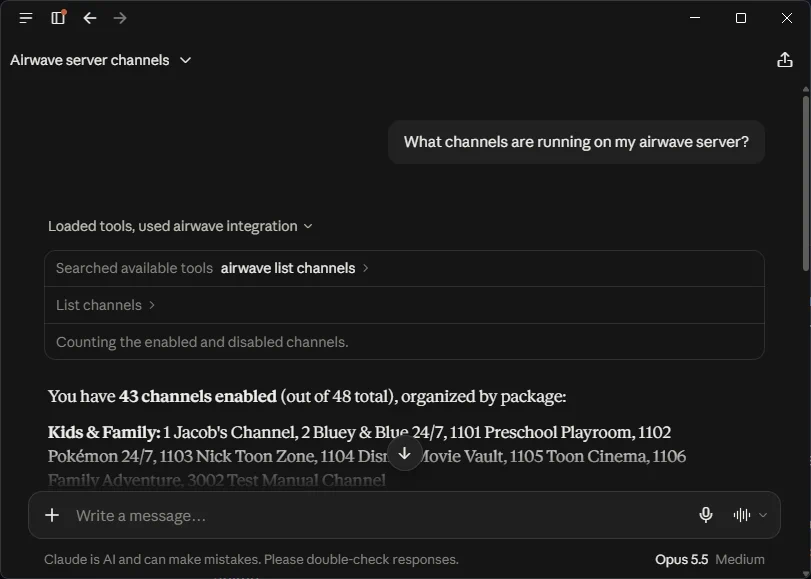
One more, for the tinkerers: Airwave speaks MCP now. Generate an admin API key on the new API Keys settings page, point an MCP client like Claude Desktop at your server with the snippet it gives you, and all 30 of Airwave's assistant tools, the same ones the built-in assistant uses, are available in that client. So you can explore your library and build or edit channels from whatever agent you already use.
That's the week. If you want to steer what comes next, the roadmap is where you vote, and the full history is always in the changelog.
Comments