
Connections & keys
Add a provider connection, store the key encrypted at rest, test it, and assign the chat / planner / worker roles the AI features use.
The assistant is inert until you give it a model to talk to. That's a connection: a provider, a model, and (usually) an API key, added under Settings → AI Assistant (/settings/ai, apps/web/src/routes/_auth/settings/ai.tsx). This page is everything about setting one up.
Adding a connection
Go to Settings → AI Assistant and add a connection with a provider, a model, and (usually) an API key.
Supported providers (AI_PROVIDERS, config.ts:16), each mapped to a Vercel AI SDK model by the getModel factory (config.ts:21-35):
Provider (provider) | Adapter | Notes |
|---|---|---|
anthropic | @ai-sdk/anthropic | Claude models |
openai | @ai-sdk/openai | GPT / o-series |
google | @ai-sdk/google | Gemini |
zai | @ai-sdk/openai at the z.ai endpoint | Z.ai (GLM) — first-class cloud provider. Pick a GLM model, paste a z.ai key. Very cheap; the *-flash models are free. See below. |
compatible | @ai-sdk/openai with a custom baseUrl | Any OpenAI-compatible endpoint — Ollama, LM Studio, vLLM, OpenRouter. The key may be omitted for a keyless local endpoint. Only tool-calling-capable models drive the agent well. |
The assistant is a tool-using agent — it only works well with a model that can call tools. A model that can't will chat but never actually discover fields, preview filters, or build anything.
Running a local model? The thing that matters is tool-calling — plus, for a reasoning model, turning thinking down or off so the planner is fast (it no longer times out — a slow model runs to completion — but heavy reasoning is slow and can exhaust the output budget). See Local & self-hosted models for the full guide and a known-good config.
Z.ai (GLM) — cheap cloud planning
Z.ai is a first-class provider: choose it in the dropdown, pick a GLM model, and paste the API key z.ai issues you — exactly like Claude or GPT, no base URL to configure. It's the standout value for the AI lineup builder because the planner is a single call per build, and GLM prices it at almost nothing:
glm-5.3-flash— about $0.075 / $0.25 per million in/out tokens, so a typical planner call (~20k in / 1.5k out) runs about $0.002.glm-4.7-flashandglm-4.5-flash— free.
That makes the planner-role split compelling: point the planner at a cheap/free GLM model for fast,
seconds-not-minutes design, and keep a local (or equally cheap GLM) model on the worker role for the dozens of
per-channel builds. A full dry-run lineup on glm-5.3-flash builders costs under a cent.
Reasoning effort. GLM-5.3 has always-on thinking (it can't be disabled), and it defaults to max effort — which is slow and can exhaust the output-token budget, truncating the plan. A Reasoning effort dropdown (low / high / max) appears on z.ai connections; set it to low for a fast planner, raise it if you want deeper reasoning. This is the z.ai equivalent of the local "disable thinking" toggle.
Under the hood, z.ai's OpenAI-compatible API doesn't honor OpenAI's strict
json_schemastructured-output format, so Airwave transparently converts the lineup planner's request to JSON-object mode with the schema in the prompt. You don't need to do anything — GLM structured output "just works" for the planner.
Keys are encrypted at rest
A key is stored in AiConnection.apiKeyEnc as AES-256-GCM ciphertext, never plaintext (config.ts:152, createConnection). Encryption is app-level via node:crypto, with the key derived from BETTER_AUTH_SECRET (packages/api/src/services/crypto.ts). Two consequences worth knowing:
- The API never returns a key back to the UI — the connection list exposes only
hasKey(listConnections,config.ts:51-64). - If
BETTER_AUTH_SECRETchanges, every stored key (and the Plex token, which uses the same scheme) becomes undecryptable and must be re-entered. Keep it stable.
Test button
Each connection card has a Test action that does a cheap round-trip ("reply with the single word: ok") to prove the provider / model / key actually work (testConnection, config.ts:192-208). Use it before you rely on a connection — a wrong key or an unreachable local endpoint fails here instead of mid-build.
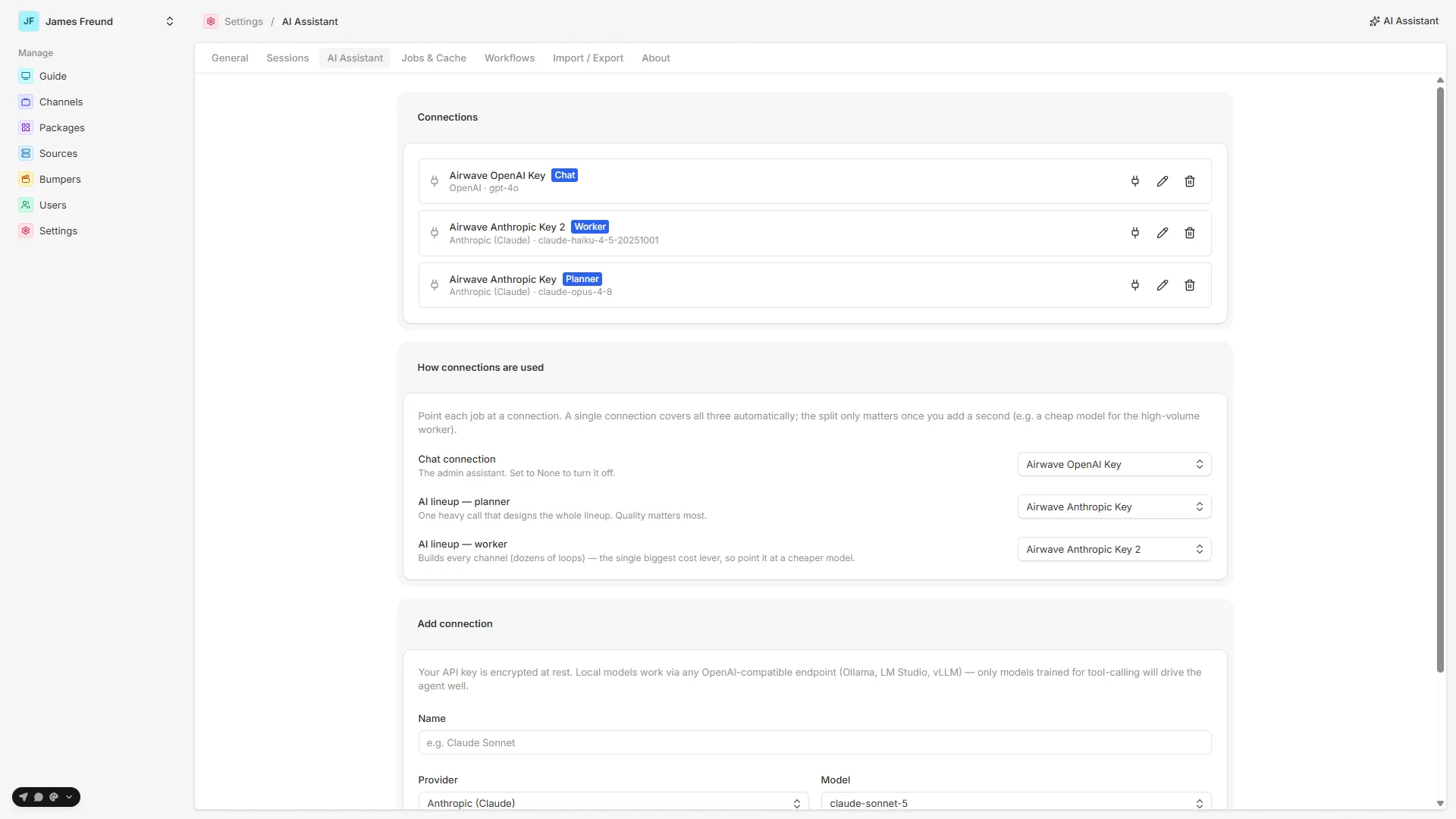
Per-role connections
A connection can hold up to three independent roles (AiConnection in packages/db/prisma/schema/ai.prisma:12-34):
- Chat (
isActive) — the model the admin assistant uses. This is the only role that matters for the chat on this page. - Planner (
isPlanner) — one big reasoning call in the durable AI lineup builder. - Worker (
isWorker) — the ~50 per-channel build loops in that same builder.
The first connection you create automatically claims all three roles, so a single-connection setup needs no further configuration (createConnection, config.ts:144-159). The split only matters once you add a second connection — e.g. point the high-volume worker at a cheap model to cut lineup-build cost. Assign roles under "How connections are used" on the settings page (settings/ai.tsx:252-296); planner / worker also offer "Same as chat". Roles are explicit with no runtime fallback — a cleared planner / worker genuinely disables the AI lineup builder (getConnectionForRole, config.ts:99-112).
The full role reference — including which model each AI feature reaches for — lives on Settings → AI connections.
See also: Settings → AI connections · Exploring your library · Assistant vs the lineup builder
AI assistant
The optional, bring-your-own-key chat that helps you author channels.
Local & self-hosted models
Run the assistant and the AI lineup builder against a local OpenAI-compatible model (Ollama, LM Studio, vLLM, OpenRouter) — the two settings that decide whether it works, plus a known-good config.