
Background jobs
The in-process node-schedule job system that runs Airwave's recurring maintenance — metadata sync, schedule top-ups, cleanup — on a schedule or on demand.
Airwave runs its recurring server-side work — refreshing the metadata cache, topping up channel
schedules, pruning old slots, reaping dead watch sessions — through a small in-process background-job
system. It is deliberately minimal: node-schedule
running in the API process, single-instance, with no Redis, no queue, and no external worker. The
whole runtime is a Map in memory plus one thin database table.
This follows the pattern used by Overseerr/Jellyseerr ("seerr"), which was the reference when the runner was decided (master plan §8, "Job/cron runner — DECIDED v0.1.9"). The reasoning:
- Airwave is always a single self-hosted box. There is one API process and no horizontal-scaling story. A broker exists to coordinate many workers — capacity Airwave neither has nor wants to force a self-hoster to stand up.
- The jobs are coarse and idempotent. They iterate enabled sources and channels, topping up or reconciling state. Running one twice is harmless; a missed run is caught by the next. That tolerance is what makes an in-process scheduler safe.
- Simplicity for self-hosters. Nothing extra to run.
How a job runs
Every job is one entry in the code-side catalog (JOB_DEFINITIONS), carrying its id, name,
human-readable description, an interval type, a defaultCron, an optional manual flag, and the
run function itself. The editable cron and the last-run bookkeeping live in the Job table; the
work always lives in code.
- Register. At boot,
startJobs()upserts aJobrow for every definition (seedingcronSchedulefromdefaultCrononly the first time) and, for non-manual jobs, armsschedule.scheduleJob(cron, ...). The schedule is rebuilt from the persisted cron, so an edited cadence survives restarts. - Run. Both the scheduled tick and the "Run now" button call the one
runJob(id)path. It builds anAbortController, flips arunningflag, and awaitsrun(signal, { progress })— passing the job an abort signal to check between units of work and a progress callback for live reporting. - Report & record. The job may call
ctx.progress({ current, total, label }); the scheduler keeps only the latest value in memory for the admin UI. On finish it stampslastFinishedAtandlastStatus("success"/"failed"), pluslastErroron a throw.
Best-effort bookkeeping. Every prisma.job.update in the run path is wrapped in .catch(() => {})
— a database hiccup writing status never fails an otherwise-successful job, though it can leave
lastStatus momentarily stale. The running flag, the AbortController, and live progress are all
in-memory only; a restart mid-run simply loses that an attempt was in flight.
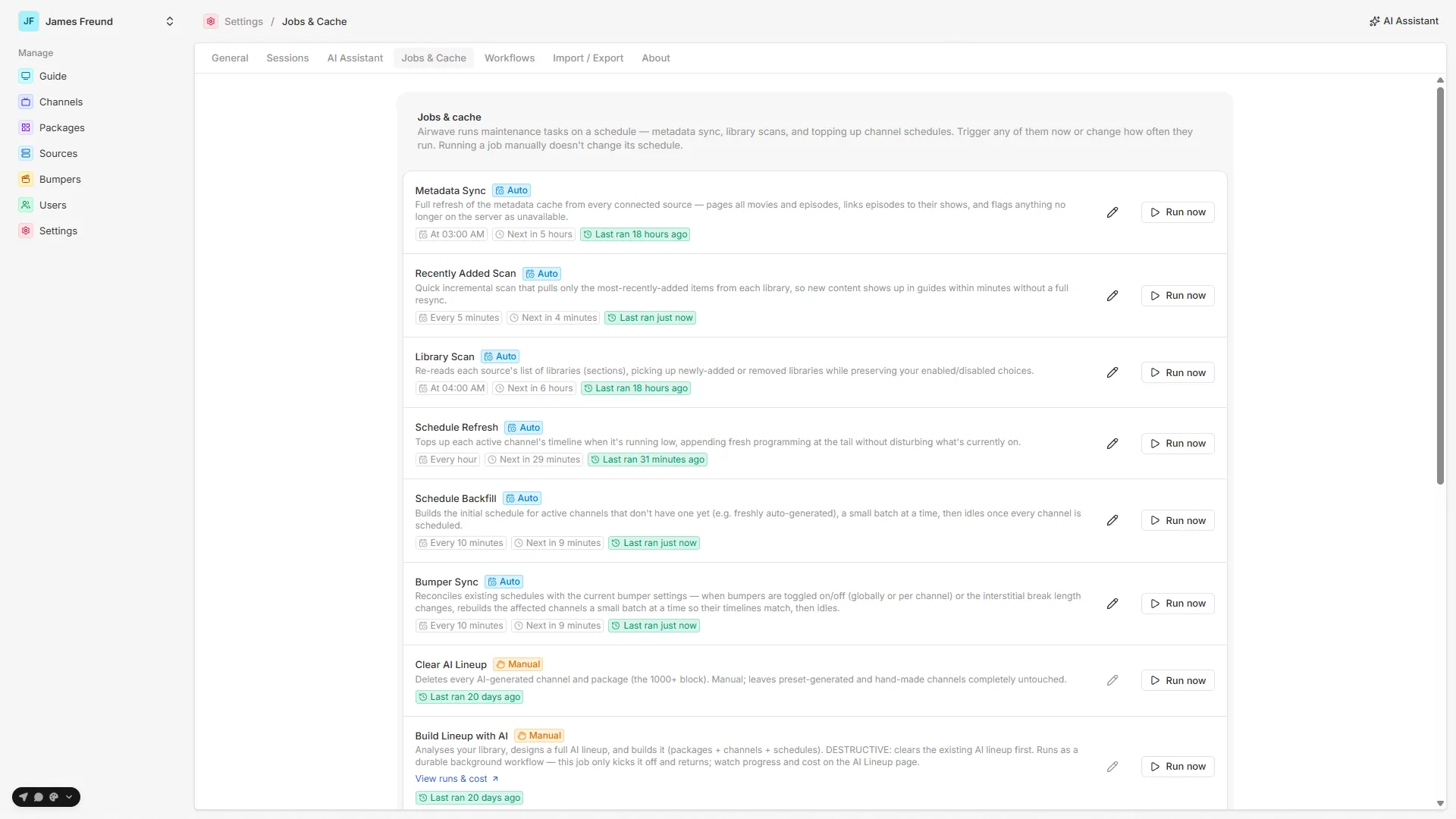
Surfacing. The admin page at Settings → Jobs polls a single read model (listJobs(), which
joins the static catalog, the live registry, and the Job row) and renders each job's cadence,
next-run time, last result, and a live progress bar. From there an admin can Run now, Cancel
a running job, or Edit an auto job's cadence.
Not to be confused with Workflows. The two genuinely long-running, must-survive-a-restart operations — the AI lineup build and content import — do not run inside this system. They run on the durable Workflow engine. A background job here can only dispatch such work and return immediately (see
ai-lineup-build).
In this section
The job catalog
Every scheduled and manual job — what it does, how it works, and its default cadence.
A run's lifecycle
How one run works internally: the LiveJob, the abort signal, progress reporting, and best-effort bookkeeping.
Running & scheduling
The Settings → Jobs UI — Run now, Cancel, and the interval-to-cron schedule editor.
Source map
| Concern | File |
|---|---|
Job catalog (JOB_DEFINITIONS) | packages/api/src/services/jobs/definitions.ts |
| Runtime (registry, boot, run/cancel/reschedule, read model) | packages/api/src/services/jobs/scheduler.ts |
tRPC surface (list / run / cancel / setSchedule) | packages/api/src/routers/jobs.ts |
Persistent state (Job model) | packages/db/prisma/schema/job.prisma |
| Admin UI (Settings → Jobs) | apps/web/src/routes/_auth/settings/jobs.tsx |
| Boot call | apps/server/src/index.ts (await startJobs()) |
See also: The schedule · Sources · Bumpers
Assistant vs the lineup builder
Airwave has two distinct AI systems — the in-the-loop chat and the autonomous durable lineup builder. How they differ, and what they share.
The job catalog
Every scheduled and manual background job — its purpose, how it works, and its default cadence — straight from JOB_DEFINITIONS.