
Channels
How a channel is built — its candidate pool, ordering, optional grouping/rotation strategies, and how it all becomes a continuous, always-on timeline.
New here? Start at Getting started, then come back. Channels live inside packages and draw their media from a connected source. If you'd rather not build channels by hand, the AI assistant can author a whole lineup for you — everything here is what it's writing under the hood.
What a channel is
A channel is two things wired together:
- A candidate pool — the set of movies and/or episodes it's allowed to play, produced by a definition. Today that definition is a predicate (a filter): "90s comedies", "everything Studio Ghibli", "unwatched sci-fi episodes". Airwave resolves the filter against your media server and gets back a concrete list of items.
- An ordering — how that pool is laid out: shuffled, or sorted by a field you choose. An optional strategy layers grouping and rotation on top (marathons, round-robins).
From those two inputs Airwave materializes a schedule: a back-to-back, gapless timeline of program slots (plus any bumper breaks) stretching days into the future. The build is deterministic and seed-driven — the same pool + ordering + seed always produce the same lineup, so every viewer tuning in sees the same thing at the same wall-clock moment, and a rebuild reproduces it exactly.
Every channel is bound to exactly one media source (mediaSourceId) and can only be created once
that source is connected and synced — there's no media to filter or schedule against otherwise.
The create call enforces this (packages/api/src/routers/channels.ts create): it rejects a source
that isn't connected, or that has zero synced mediaItems, with a message telling you which step is
missing.
Admin UI: Channels → New (apps/web/src/routes/_auth/channels/new.tsx) to create, Channels →
<channel> ($channelId.tsx) to edit, preview, and schedule. Both render the same
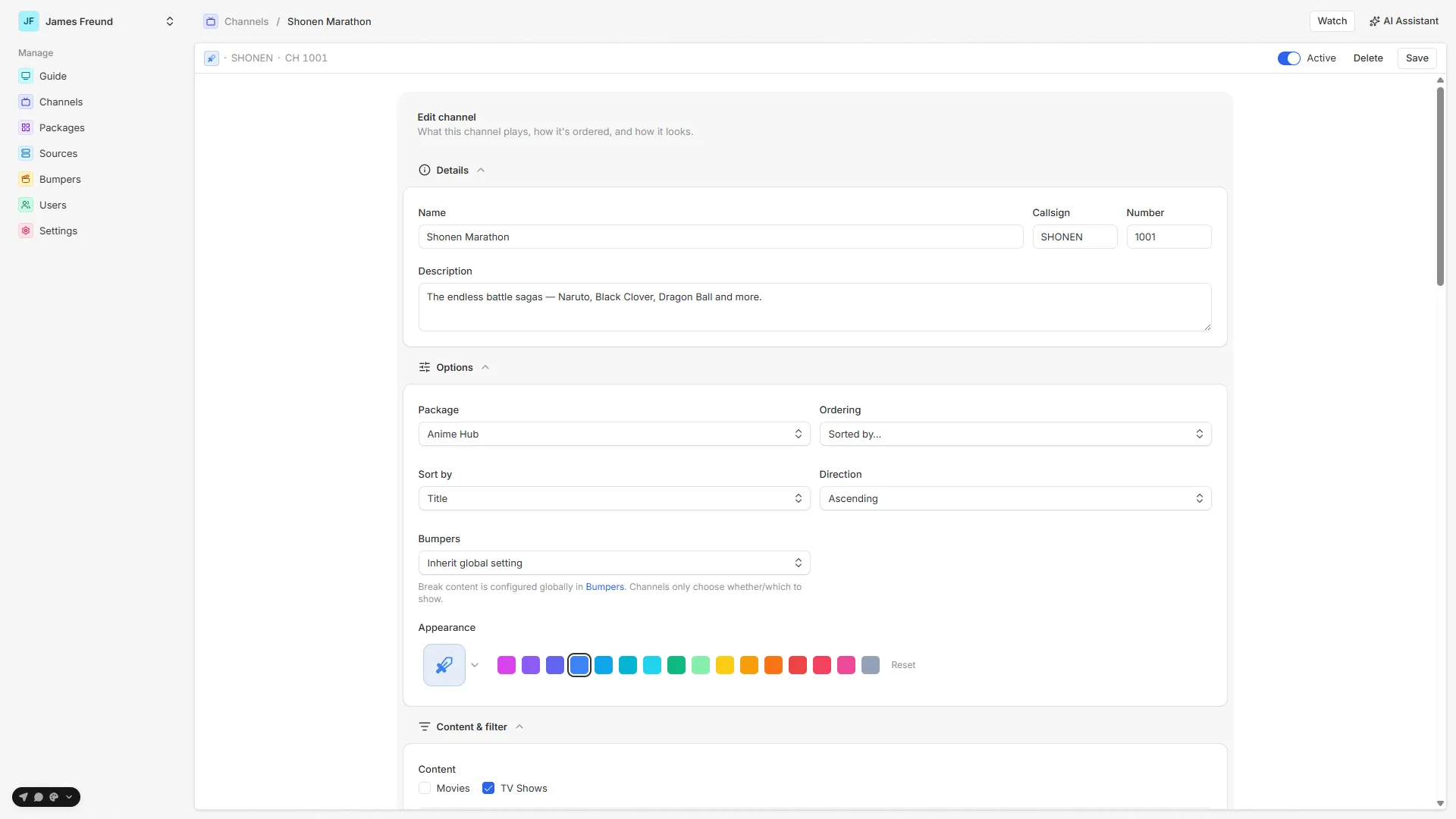
ChannelForm (apps/web/src/features/channels/channel-form.tsx), split into collapsible sections:
Details, Options, Content & filter, and Advanced — grouping & rotation.
In this section
Filters
The filter builder — conditions, AND/OR nesting, and how fields resolve for movies vs TV.
Ordering
Shuffle (seeded, per-pass) or Sorted by a field — the base order of the pool.
Strategies
Optional grouping & rotation — marathons, round-robins, and no-repeat constraints.
The schedule
How the recipe becomes a materialized timeline, and the jobs that grow and heal it.
Channel identity
The Details and Options sections carry the channel's identity (channel.prisma Channel):
- Name — display name (e.g. "90s Comedies"). Required.
- Number — the guide channel number. Unique across the instance; leave blank on create and
Airwave assigns the next free number (
max(number) + 1). - Callsign — a short memorable code, uppercased and capped at 6 chars (e.g.
90SCOM). Normalized on save; optional. - Description — optional blurb for what the channel is.
- Package — the package this channel belongs to (optional). A channel with no icon or tint of its own inherits the package's.
- Appearance — icon & tint — a Lucide/Phosphor icon plus an accent tint from a fixed palette
(
services/accents.tsACCENT_KEYS— purple, blue, teal, green, amber, orange, red, rose, …). The tint is stored as a stable key and each client maps it to its own hues; an unknown key degrades to neutral. Leave both empty to inherit the package's look. - Active (the header toggle) — the
enabledflag. Inactive channels aren't selectable in the guide and are skipped by the schedule jobs. - Bumpers — a thin per-channel mode (Inherit / Off / Interstitial only / Full). The actual break content is configured globally under Bumpers; a channel only chooses whether and which to show.
Tips & gotchas
- Curate over bare genre sweeps. A single
Genre is Comedycan pull in thousands of loosely related items. Tighter, intentional filters (a decade, a studio, a network, a hand-picked set of shows) make a channel that feels authored rather than a firehose — and resolve faster. This is exactly how the AI assistant builds lineups: many narrow channels, not a few giant ones. - Genre is on the show, not the episode. Filtering TV by genre matches the series' genre; episodes carry no genre of their own. Use episode-level fields (resolution, air date, unwatched) when you mean the individual episode.
- The grouping filter is one level in the UI. The content filter and each grouping rule's filter both cap at one level of sub-groups in the builder (the resolver itself has no depth limit).
- A strategy needs a rebuild to show. Editing the strategy doesn't retro-actively rewrite the live timeline — hit Generate schedule to apply it now, or wait for the next full rebuild.
- Shuffle ignores the sort field. Sort field/direction only matter for a Sorted channel; a Shuffle channel derives its order from the seed.
- Tag values are matched by title. If a filter dropdown is empty, the source may not be synced, or no library of the selected content types carries that tag.
Source map
| Concern | File |
|---|---|
| Channel form (all sections) | apps/web/src/features/channels/channel-form.tsx |
| Filter builder (conditions, AND/OR, nesting) | apps/web/src/features/channels/filter-builder.tsx |
| Strategy editor (grouping & rotation) | apps/web/src/features/channels/strategy-editor.tsx |
| Preview tiles | apps/web/src/features/channels/channel-preview.tsx |
| Routes (new / edit) | apps/web/src/routes/_auth/channels/{new,$channelId}.tsx |
| API router (create/update/get/list, preview, generate/extend, filterFields/filterValues) | packages/api/src/routers/channels.ts |
| Filter field catalog + Plex param building | packages/api/src/services/plex/filter-fields.ts |
| Filter resolution (set-algebra AND/OR, dotted TV syntax) | packages/api/src/services/plex/resolve.ts |
| Ordering / sort fields | packages/api/src/services/plex/sort-fields.ts |
| Strategy engine (grouping, rotation, no-repeat) | packages/api/src/services/schedule/timeline.ts |
| Local grouping-filter eval | packages/api/src/services/schedule/local-filter.ts |
| Schedule build / extend / repair | packages/api/src/services/schedule/generate.ts |
| Accent tint palette | packages/api/src/services/accents.ts |
| Data model (Channel, ChannelDefinition, kinds) | packages/db/prisma/schema/channel.prisma |
| Background jobs | jobs |
See also: Getting started · Packages · Sources · Background jobs · AI assistant