
Managing a source
Everyday source management — rename, rescan, sync — and the type-DELETE danger zone that cascade-deletes everything built from a source.
Once a source is connected, everything you do to it lives on the source detail page
(apps/web/src/routes/_auth/sources/$sourceId.tsx), backed by the sources tRPC router
(packages/api/src/routers/sources.ts). Most of it is low-risk; one action isn't.
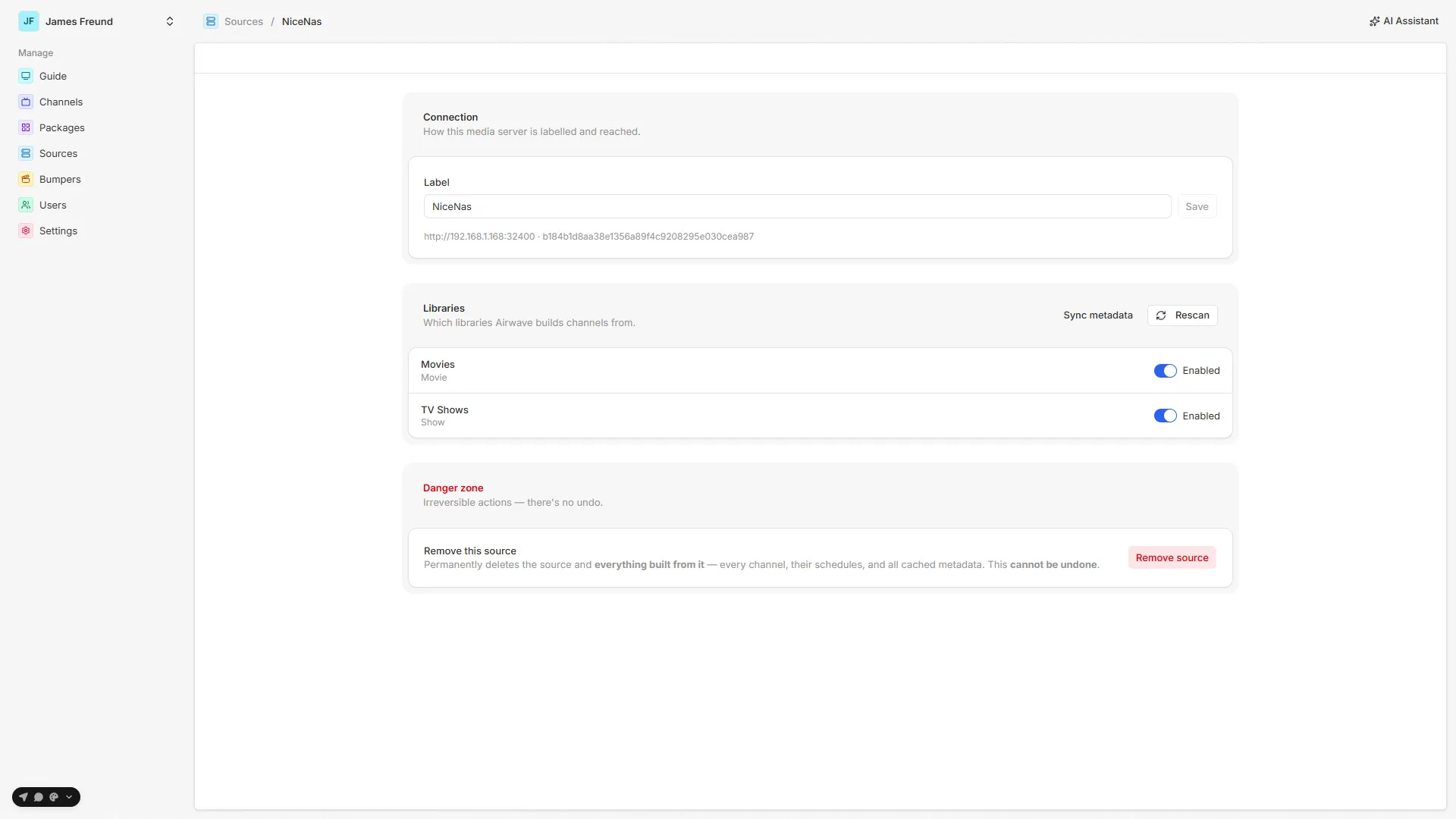
Everyday management
| Action | Call | Effect |
|---|---|---|
| Rename | sources.updateLabel | Changes the source's display label only. It does not touch the connection — baseUrl and machineIdentifier are shown read-only beneath the field. |
| Toggle a library | sources.setLibraryEnabled | Enables/disables which sections feed channels. See Libraries. |
| Rescan | sources.rescan | Re-reads the library list (added/removed sections), preserving enable/disable choices. |
| Sync metadata | jobs.run (metadata-sync) | Full refresh of the item cache, with live progress. See Metadata sync. |
To change where the server is reached or refresh a re-issued token, there's no edit form —
re-run Sign in with Plex and pick the same server. saveConnection
dedupes by machineIdentifier and updates the existing row in place, so nothing built on the source
is lost.
Danger zone: removing a source
The page ends with a destructive-tinted Danger zone. Removing a source
(sources.remove → prisma.mediaSource.delete) is a cascade delete. Because Channel,
MediaItem, and MediaLibrary all reference MediaSource with onDelete: Cascade
(packages/db/prisma/schema/media-source.prisma), deleting the source also deletes:
- every channel built from it, and all of their schedules,
- all cached metadata (
MediaItemrows), and - all library rows (
MediaLibrary).
There is no undo.
The type-DELETE confirm
To make that impossible to do by accident, the UI gates removal behind a type-DELETE-to-confirm
modal: the destructive Delete source button only arms once you type DELETE exactly
(DeleteSourceModal, same file). The button's spinner blocks re-clicks while the delete runs, and
on success you're returned to the source list.
Reconnecting is not removing. If a source's token broke (a secret rotation or a revoked token), you do not need to delete it — reconnect to update the row in place. Deletion is only for permanently retiring a server and everything derived from it.
A related action: import Plex users
The same connected source powers Import Plex Users (plex.importUsers →
importPlexUsers), which bulk-creates Viewer accounts from the people the Plex server is shared
with — matched by Plex email, idempotent (existing emails are skipped), and never touching
env-seeded admins. It lives with access control rather than source management; see
Users & access control.
See also: Connecting a server · Libraries · Metadata sync · Token security
Token security
The Plex owner token encrypted at rest, its dependency on BETTER_AUTH_SECRET, the boot backfill, and how to recover after a secret rotation.
Channels
How a channel is built — its candidate pool, ordering, optional grouping/rotation strategies, and how it all becomes a continuous, always-on timeline.