
Metadata sync
The MediaItem cache that lets guides render without hitting Plex, and the background jobs that keep it fresh.
Discovering libraries is cheap; caching the items inside them is the
heavier job. Airwave keeps a dedicated MediaItem cache so schedules and guides never need a live
round-trip to Plex just to display a title, poster, or badge.
The MediaItem cache
Every movie and episode is stored as one MediaItem row, unique per (mediaSourceId, ratingKey)
(packages/db/prisma/schema/media-source.prisma). Each row holds the essentials for ordering
(durationMs, year, airDate) plus a denormalized guide JSON bundle — title, summary,
genres, cast, studio, art, and media badges (resolution, HDR/Dolby Vision, audio channels, object
audio, video codec). That bundle is assembled from Plex by toGuideMeta
(packages/api/src/services/plex/client.ts) and is exactly what a guide or preview renders with no
second call to the server. Schedule slots point at a MediaItem via mediaItemId instead of
copying metadata onto every row.
The hierarchy matters for TV. Shows are upserted first, then episodes are linked to their parent
show via parentId, so an episode can inherit show-level metadata (genres, cast, art) it doesn't
carry itself. Movies are standalone (no parent). This is why filtering TV by genre matches the
series' genre — see Filters.
Soft deletes, not hard deletes
The cache is refreshed, not rebuilt. When the full sync finishes, removal detection flags
anything it didn't touch this pass — rows whose lastSyncedAt predates the scan — by setting
available = false rather than deleting them (syncMediaItems,
packages/api/src/services/media/sync-media.ts). Schedules built on now-removed media still render,
and the Missing Media Repair job later re-flows the affected timelines. An item that
reappears on the server flips back to available = true on the next sync.
The sync jobs
Three background jobs keep the cache fresh — all defined in
packages/api/src/services/jobs/definitions.ts (full catalog in Background jobs). They
iterate every enabled source and, within each, every enabled library.
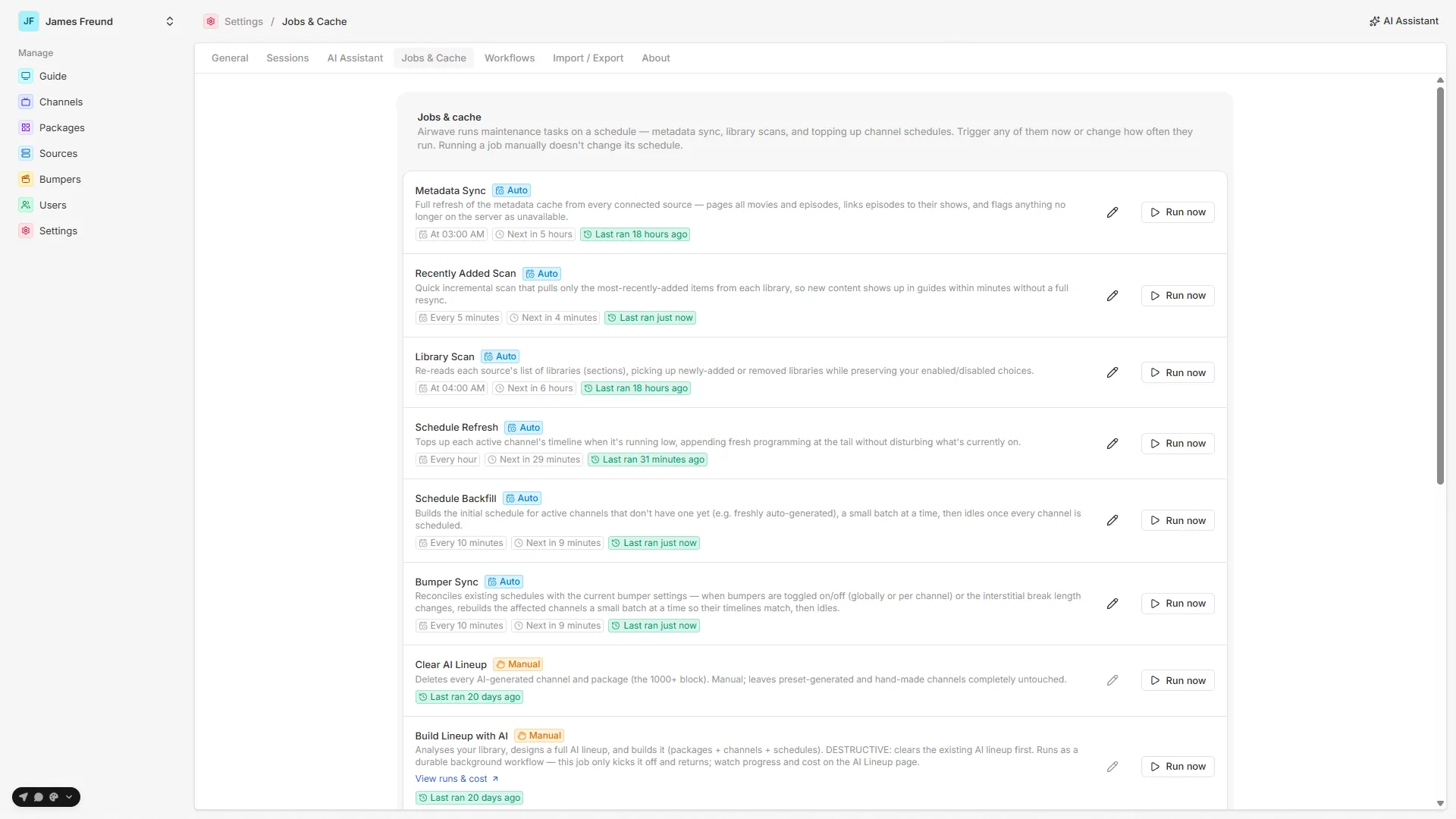
| Job | ID | Cadence | What it does |
|---|---|---|---|
| Metadata Sync | metadata-sync | Daily 03:00 | Full refresh: pages all movies and episodes from every enabled source (getAllSectionItems, 500/page), links episodes to their parent shows, and flags anything no longer on the server as available: false. |
| Recently Added Scan | recently-added-scan | Every 5 min | Cheap incremental — pulls only the most-recently-added items per library (getRecentlyAdded, sort=addedAt:desc), so new content appears in guides within minutes without a full resync. |
| Library Scan | library-scan | Daily 04:00 | Re-reads each source's library list (same as a manual Rescan), picking up added/removed sections while preserving your enable/disable choices. |
Running a sync on demand
The source detail page's Sync metadata button runs the metadata-sync job immediately
(jobs.run) and shows live progress — the page polls jobs.list every 2 seconds and renders a
per-library progress bar (apps/web/src/routes/_auth/sources/$sourceId.tsx). Run it right after
connecting so the source reaches Ready without waiting for the 03:00
job; a source can't have channels built against it until its cache holds at least one item.
Sync after big library changes. The 5-minute incremental only catches recent additions. After a bulk import, a re-tag, or a metadata refresh in Plex, run a full Sync metadata so the cache reflects it everywhere rather than trickling in.
See also: Libraries · Background jobs · Channels · Filters
Libraries
How Plex sections become MediaLibrary rows, which ones feed channels, and how a rescan picks up added or removed libraries without clobbering your choices.
Connections
The LAN, remote, and relay URLs a source stores, the hourly refresh that keeps them current, and how a TV probes them to stream from off-network.