
AI connections
Add an AI provider connection (bring-your-own-key), store the key encrypted at rest, test it, and assign the chat / planner / worker roles that the assistant and the AI lineup builder use.
The AI Assistant tab (/settings/ai) is where you wire Airwave to a language model. This page is
about the connections — adding a provider, storing its key, and pointing each job at it. For what
the assistant actually does once connected (chatting, building lineups), see the
AI assistant.
Airwave ships no built-in model and no key — it's bring-your-own. Nothing AI works until at least
one connection exists. The whole tab is adminProcedure-gated (packages/api/src/routers/ai.ts).
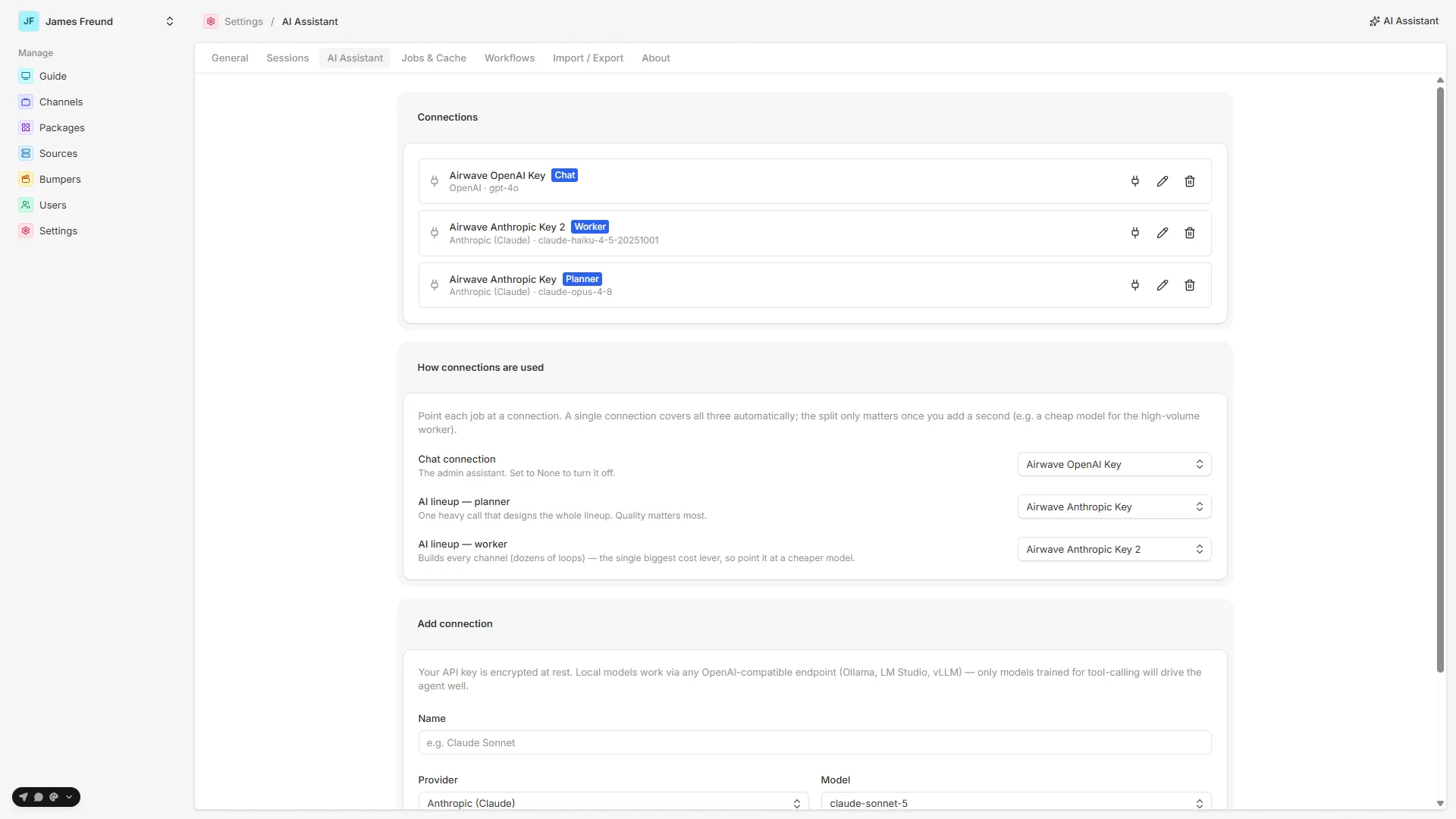
Adding a connection
The Add connection form (apps/web/src/routes/_auth/settings/ai.tsx) takes:
| Field | Notes |
|---|---|
| Name | A label for the card (e.g. "Claude Sonnet"). Optional — defaults to <provider> · <model> if blank. |
| Provider | One of five (below). |
| Model | A curated dropdown per provider, or Custom… to type any model id. For a compatible endpoint it's always free-text. |
| Base URL | Shown only for OpenAI-compatible / Local — e.g. http://localhost:11434/v1. |
| API key | Stored encrypted (see below). On edit, leave blank to keep the current key; for a local endpoint it's optional. |
| Disable thinking | Local (compatible) only. Injects the no-think flag each engine understands. |
| Reasoning effort | Z.ai (GLM) only. low / high / max — GLM-5.3 can't disable thinking, so this dials its depth. Default is the provider default (max); pick low for a fast planner. |
Providers
| Provider | Value | Key |
|---|---|---|
| Anthropic (Claude) | anthropic | Required |
| OpenAI | openai | Required |
| Google (Gemini) | google | Required |
| Z.ai (GLM) | zai | Required |
| OpenAI-compatible / Local | compatible | Optional — set a Base URL instead |
Z.ai (GLM) is a first-class cloud provider (curated GLM model dropdown + key, base URL preset). It's
the cheapest way to run the lineup planner — glm-5.3-flash is fractions of a cent per plan and the
*-flash models are free. It's reasoning-heavy by default, so use the Reasoning effort → low knob for a
fast planner. See Cloud models — Z.ai (GLM).
The compatible provider covers any OpenAI-compatible endpoint — Ollama, LM Studio, vLLM,
OpenRouter — via a custom base URL (packages/api/src/services/agent/config.ts getModel). Local
models work, but only models trained for tool-calling drive the agent well — the assistant and the
lineup builder both rely on tools.
Running a local model? The model must support tool-calling; for a reasoning model, turn thinking down/off so the planner is fast. (Slow local models no longer time out — a step runs to completion — but heavy reasoning is slow.) See Local & self-hosted models for the full guide and a known-good config.
Testing
Each saved connection has a Test button. It runs a cheap round-trip — a one-word prompt through
the real provider/model/key (ai.test → testConnection) — and reports back either the model's reply
or the provider's error inline on the card. Use it to prove the key and model id actually work before
you rely on them.
Roles — chat, planner, worker
A connection can hold up to three independent roles. They exist so you can point very different workloads at different (and differently priced) models:
| Role | Badge | What uses it |
|---|---|---|
| active | Chat | The admin assistant — every message you send it |
| planner | Planner | The AI lineup's one big reasoning call that designs the whole lineup — quality matters most |
| worker | Worker | The lineup's ~50 per-channel build loops — high volume, so the single biggest cost lever in a build |
Assign them in the How connections are used section (visible once at least one connection exists):
one dropdown per role. A role is exclusive — assigning it to a connection clears it from whichever
connection held it before (setConnectionRole).
Key behaviors, all grounded in config.ts:
- One connection just works. The first connection you create claims all three roles automatically, so a single-model setup needs no role configuration at all.
- "Same as chat" on the planner/worker dropdowns copies the current chat connection onto that flag.
- Roles are explicit — no silent fallback. Clearing the planner or worker role genuinely turns the AI lineup off (a missing planner/worker means the builder is unavailable), not "falls back to chat". This is deliberate.
- Chat always has a target. Deleting the active connection promotes the newest remaining one to active, so the assistant never ends up pointing at nothing.
The point of a second connection is exactly this split — e.g. a strong model on planner for the one design call, and a cheap model on worker for the dozens of build loops, which is where most of a lineup build's cost goes.
Keys are encrypted at rest
An API key is never stored in plaintext and is never returned to the browser — the connection list
only exposes hasKey, a boolean (listConnections). On save the key is encrypted with AES-256-GCM
(packages/api/src/services/crypto.ts) and only decrypted server-side when a model call is made.
The encryption key is derived from BETTER_AUTH_SECRET — no extra env var to manage. The tradeoff:
Keep
BETTER_AUTH_SECRETstable. It's the key for every secret encrypted at rest — the AI provider keys and the Plex owner token. Rotate or lose it and all of them become undecryptable and must be re-entered.
This runs server-side via Node's crypto, so it has no HTTPS/secure-context requirement — plain-HTTP
LAN deployments encrypt keys just fine.
Source map
| Concern | File |
|---|---|
| Connections UI (form, list, roles, test) | apps/web/src/routes/_auth/settings/ai.tsx |
API router (list/create/update/delete/setRole/test) | packages/api/src/routers/ai.ts |
| Connection service — providers, roles, model factory | packages/api/src/services/agent/config.ts |
| Secret encryption (AES-256-GCM) | packages/api/src/services/crypto.ts |
Data model (AiConnection) | packages/db/prisma/schema/ai.prisma |
See also: AI assistant · Durable workflows · Settings