
Device overrides
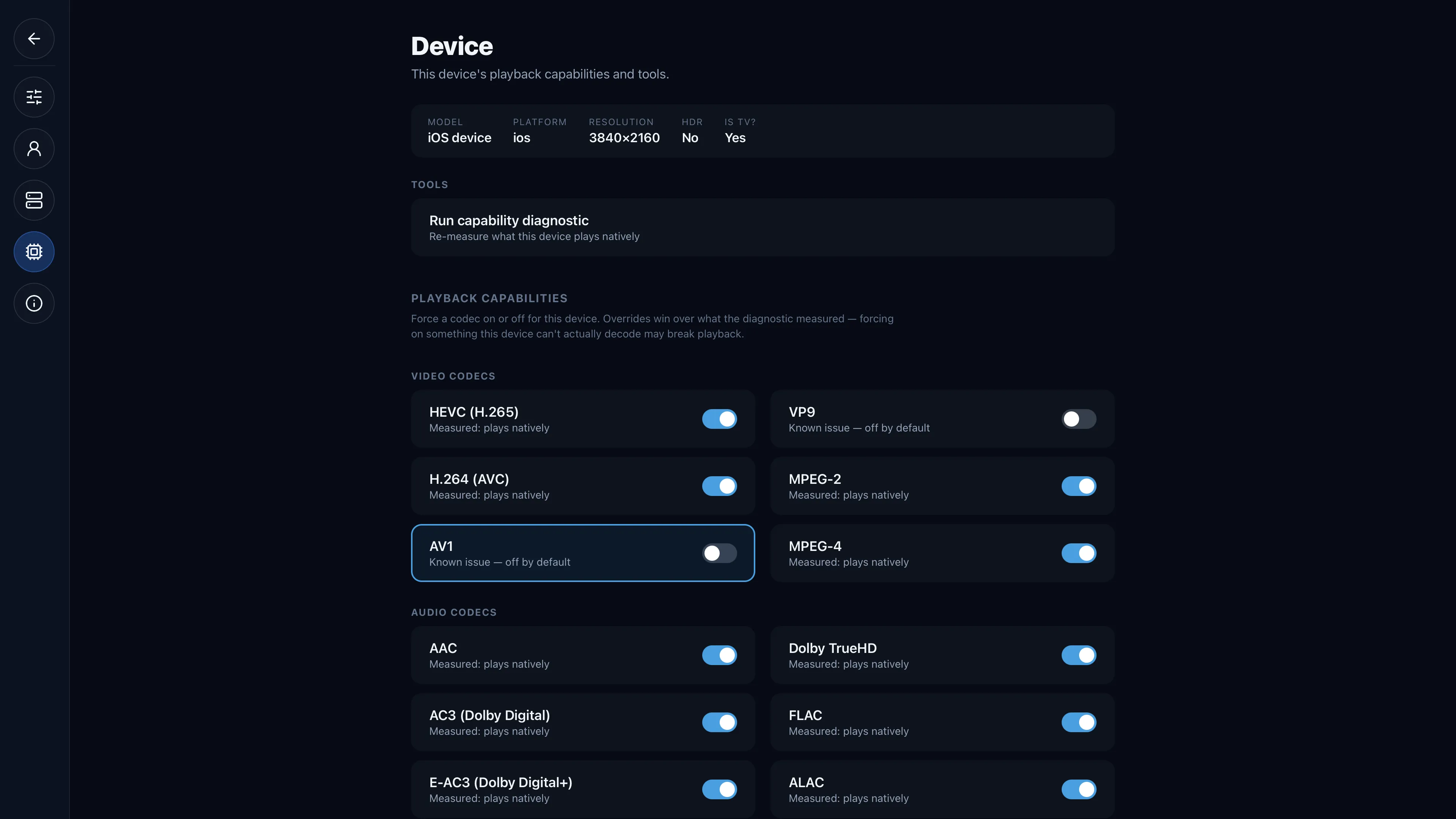
The per-device capability toggles, the known-issue quirks (AV1 off by default on Apple), and the sparse capabilityOverrides JSON.
The measurement is authoritative but not infallible, so every verdict is user-overridable from
Settings → Device (apps/tv-web/src/routes/_auth/settings/device.tsx; the RN port at
apps/tv-native/app/settings/device.tsx). The data behind the page is getDeviceCapabilityView()
(packages/api/src/services/capabilities/device-settings.ts).
The four layers
The page lists a fixed set of candidate tokens per group (Video / Audio / Containers) and, for each, shows all four layers that combine into the verdict playback uses:
| Layer | Field | Meaning |
|---|---|---|
| Measured | measured | Did the diagnostic credit it? (a clip containing it actually decoded) |
| Quirk | quirk | Is it a known-issue token, off by default? (carries the reason) |
| Override | override | Is there a manual override, and which way? (null = none) |
| Effective | effective | What playback actually uses |
The effective formula is override ?? (measured && !quirk) — the exact expression in both
applyEffective() (native-caps.ts) and the settings view. Each row's sublabel reflects its state
— "Measured: plays natively", "Known issue — off by default", or "Overriding — diagnostic
measured plays/doesn't play" — and a Forced pill warns when you've forced on something the
diagnostic says doesn't play (effective && !measured), since that can break playback.
Known-issue quirks
Some codecs pass the isolated diagnostic but fail our real playback paths, so they're dropped from
the credited set by default (codecs.ts, videoQuirks/audioQuirks). Quirks are
platform-scoped: one with no platforms applies to every device; one with platforms applies
only to matching TvDevice.platform values ("webos" | "browser" | "ios" | "android"), so a codec
broken on one client isn't needlessly transcoded on another.
| Codec | Kind | Scope | Reason |
|---|---|---|---|
dts | audio | global | LG webOS has no DTS/DCA audio decoder (licensing) — the clip's video decodes but audio is silent. |
vp9 | video | global | On the LG C2, VP9 decodes in isolation (it's what YouTube uses) but raw-file direct-play errors (code 4) and VP9-in-MSE stalls. |
av1 | video | platforms: ["ios"] | mpv/MPVKit software-decodes AV1 via dav1d, which null-crashes on Apple clients (iPad / Apple TV). |
AV1 on Apple ships off by default
av1 is the platform-scoped quirk: on the Apple mpv clients there's no reliable hardware AV1 path,
and mpv's dav1d software decoder null-crashes the decode thread. So AV1 is a known issue only on
ios — the C2 has hardware AV1 and Android mpv may hardware-decode via MediaCodec, so they're left
alone. This is belt-and-suspenders with the client: the native diagnostic skips playing AV1 clips
on Apple entirely (CRASHY_VIDEO_ON_APPLE) so the probe itself never crashes, and the server-side
quirk force-transcodes AV1 to H.264 for those platforms even if a clip somehow got credited. You can
still force it on per-device — but that's the one override most likely to break playback on an Apple
client.
The overrides JSON
Toggling writes through setDeviceCapabilityOverride / resetDeviceCapabilityOverrides, which
persist a sparse blob on TvDevice.capabilityOverrides shaped
{ video?: {token: bool}, audio?: {…}, container?: {…} }. Two things keep it tidy:
- Only genuine deviations are stored. If your new value equals the natural default
(
measured && !quirk), the override is cleared rather than stored (value = next === naturalDefault ? null : next) — so overrides persist only where they actually differ from the diagnostic. Emptying a group's last key prunes the group from the JSON. - A full reset uses
Prisma.DbNull. The Reset to diagnostic row appears whenever any override exists and clears them all at once, reverting to exactly what the diagnostic found.
Container overrides also carry aliases (native-caps.ts CONTAINER_ALIAS): forcing mp4 on also
covers m4v, and mpegts covers ts.
Recent playback issues
For context, the page also surfaces the device's recent playback issues — the last dozen
PlaybackLog rows with outcome: "error" | "not_decoding" or a non-null error, each showing the
channel/title, the source container/videoCodec/audioCodec, the delivery mode, and the error.
That lets you correlate a stutter or black screen with a specific codec and decide whether to flip an
override.
When to reach for an override
- The diagnostic was pessimistic. A codec the panel really does play got left
undefined(the audio-track API never proved itself, say). Force it on and confirm playback is clean. - A quirk is wrong for your hardware. A newer panel that genuinely decodes something on the global quirk list — force it on for that device only; the quirk still protects everyone else.
- The diagnostic was optimistic. A clip decoded in isolation but the real file stutters or blacks out (visible in Recent playback issues). Force it off and Airwave transcodes it instead.
Leave the rest alone: with no override, a codec follows the diagnostic, which is right far more often than a guess. See How it works for what the measurement actually records.