
Assigning channels
Channels join a package from the channel form, not the package page — and inherit its icon and tint via resolveTile.
Assignment happens on the channel, not the package
Channels are not added from the package page. The package detail page
(apps/web/src/routes/_auth/packages/$packageId.tsx) shows the channels currently filed into the
package as a read-only list — each with a channel number, its resolved icon tile, callsign, an
Inactive badge when disabled, its ordering, and an enable/disable switch
(channels.setEnabled). Its empty state says: "Assign a channel to this package from its edit page
(the Package dropdown)."
Where the assignment happens: apps/web/src/features/channels/channel-form.tsx. The form's
Options section has a Package Select populated from trpc.packages.list. Choosing a package
sets the channel's packageId; choosing None sends packageId: null (the form maps the empty
string to null on save, packageId: packageId || null).
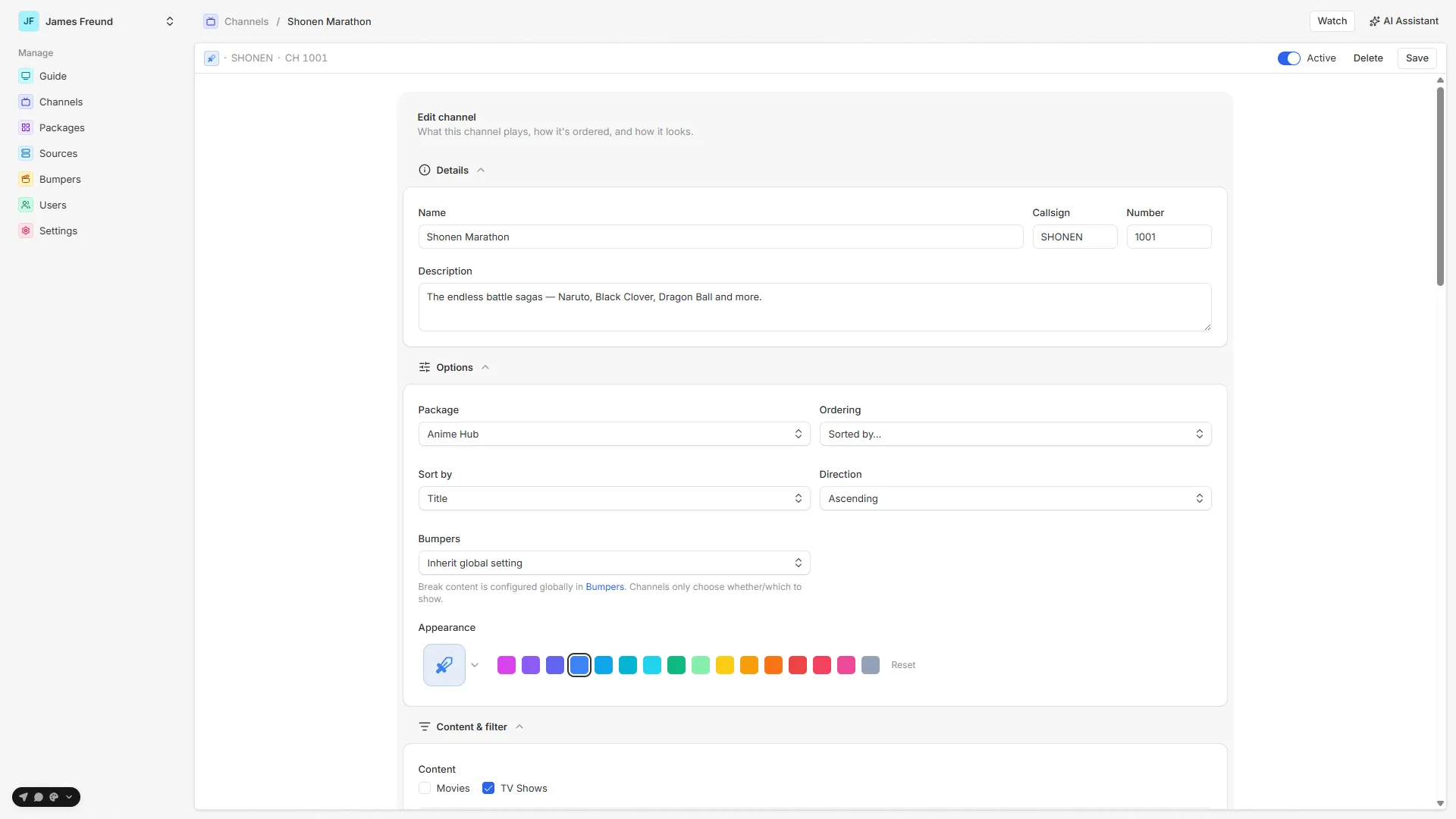
Icon & tint inheritance
A package's icon and tint are defaults its channels inherit unless the channel sets its own.
The whole app resolves this through one function, resolveTile
(apps/web/src/features/icons/app-icon.tsx), which walks an override → inherited → default chain:
const Icon = resolveIcon(opts.icon ?? opts.inheritedIcon) ?? opts.defaultIcon;
const tintName = opts.tint ?? opts.inheritedTint ?? opts.defaultTint ?? "slate";- Channel sets its own icon/tint → that wins (
Channel.icon/Channel.tintare documented in the schema as overriding the package's). - Channel sets neither → it shows the package's icon/tint (passed as
inheritedIcon/inheritedTint). - Neither exists → the caller's default (a
Tvicon,slatefallback tint).
The channel form makes the inheritance explicit: when a package is selected and the channel has set no
icon or tint, it shows "Inherits '<package>' — pick an icon or tint to override." Picking either
one flips the channel to an override; the field's Reset button clears both back to null so it
follows the package again. IconTintField receives the package's look via inheritedIcon /
inheritedTint from selectedPackage.
The same resolveTile call renders the channel row on the package detail page, on the admin Channels
page, and drives the tint on the guides — so a channel's look is computed identically everywhere.
A note on auto-generated channels
The preset generator does not rely on tint inheritance. To keep a package's contiguous block of
channel numbers from reading as one long single-color band on the guide, it assigns each generated
channel its own tint from a cycling palette (channelAccentAt in accents.ts) — see
Icon & tint. A preset that specifies its own tint still wins; a manually
created channel left blank still inherits the package tint.