
Guide lenses
How a package becomes a filter lens in the TV guide's sidebar — the viewer-facing endpoint, access scoping, and the vivid accent.
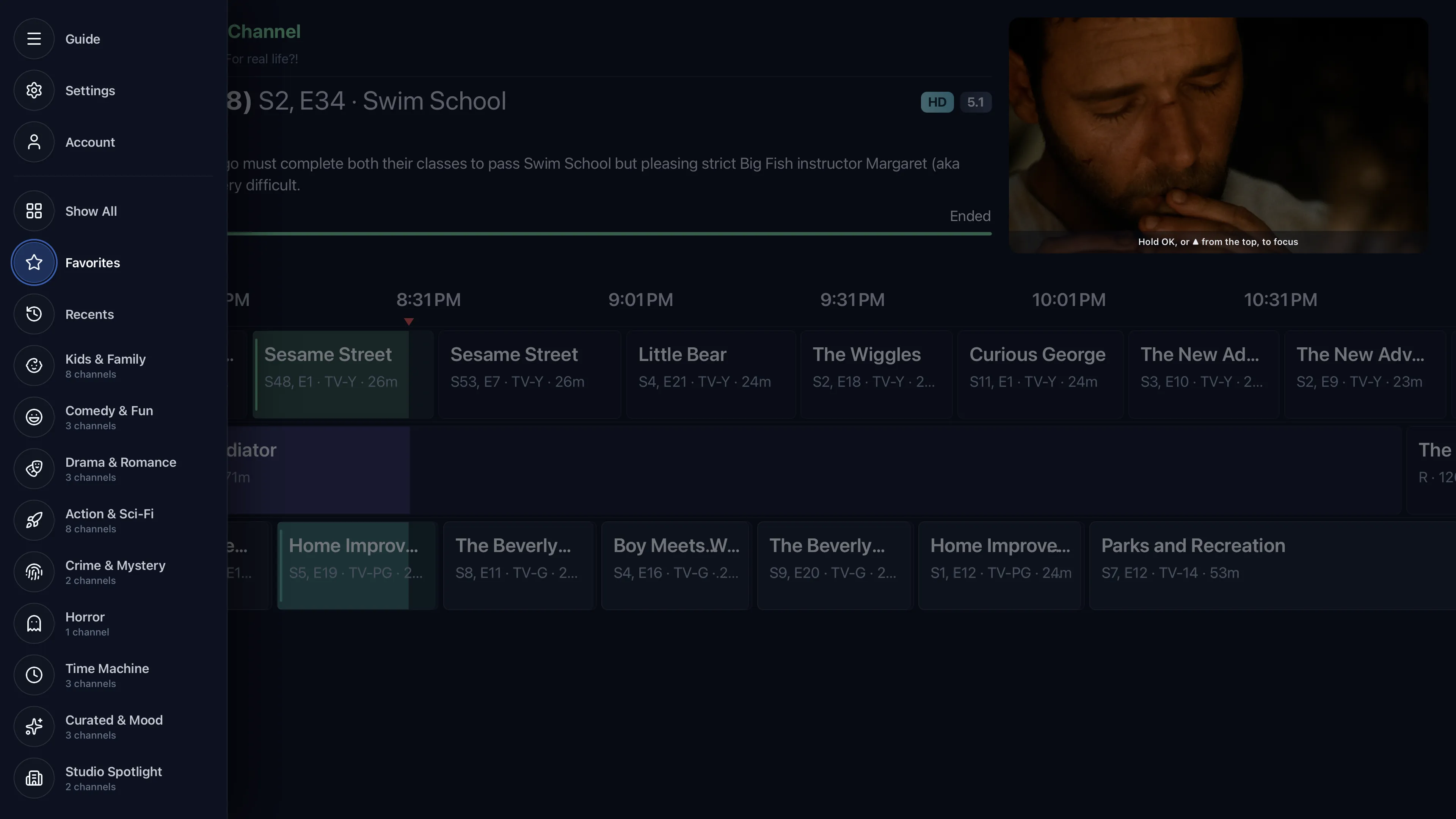
On the TV client, packages appear as the filter lenses in the guide's left sidebar. The admin's package name, icon, tint, and sort order flow straight through to how the lens looks and where it sits.
A separate, viewer-facing endpoint
Lenses do not come from the admin packages.list. They come from listActivePackages
(packages/api/src/services/packages.ts), which returns only packages that have at least one enabled
channel the viewer can access:
- Ordered by the admin sort (
sortIndex, then name), each carrying its ownicon,tint, and achannelCount. - Access-scoped. The service takes an
AccessSet:"all"counts every enabled channel; aSetof accessible channel ids counts only those, and drops any package that ends up empty for that viewer (e.g. a PARTIAL package with zero granted channels, or one the viewer can't see). Empty packages never appear as lenses. - REST:
GET /packagesinapps/server/src/rest.tswraps the service with the request's resolved access set. - TV client:
apps/tv-web/src/hooks/use-packages.tsfetches it (cached, refetched infrequently — the list rarely changes).
How the sidebar renders a lens
apps/tv-web/src/features/guide/guide-sidebar.tsx (buildSidebarItems) turns each package into a
Lens of { type: "packages", ids: [id] }. The sidebar is a collapsed sliver of glass circles:
- Collapsed, the whole filter group folds into one "Filters" circle — lit in the active filter's accent when one is applied.
- Focused, it stagger-reveals Favorites, Recents, then one lens per package — each in its
own icon and its vivid accent (
accentVivid(p.tint)— the small-surface role of the tint from Icon & tint), with the channel count as a sublabel. A package icon stored as"lucide:Name"resolves to that Lucide component, falling back to aFolder.
Selecting a package lens filters the grid to that package's channels; a "Show All" item (prepended
only while a filter is applied) clears it. Multi-select is a trivial later extension — packages.ids is
already a list — but the sidebar selects one lens at a time today.
Packages & access
Why grouping channels into packages matters beyond cosmetics — a FULL package grant is one of only two ways new content reaches a restricted viewer automatically.
Users & access control
Import viewers from Plex and grant granular, server-enforced per-user access — down to the individual channel.